Peakylight tldr;
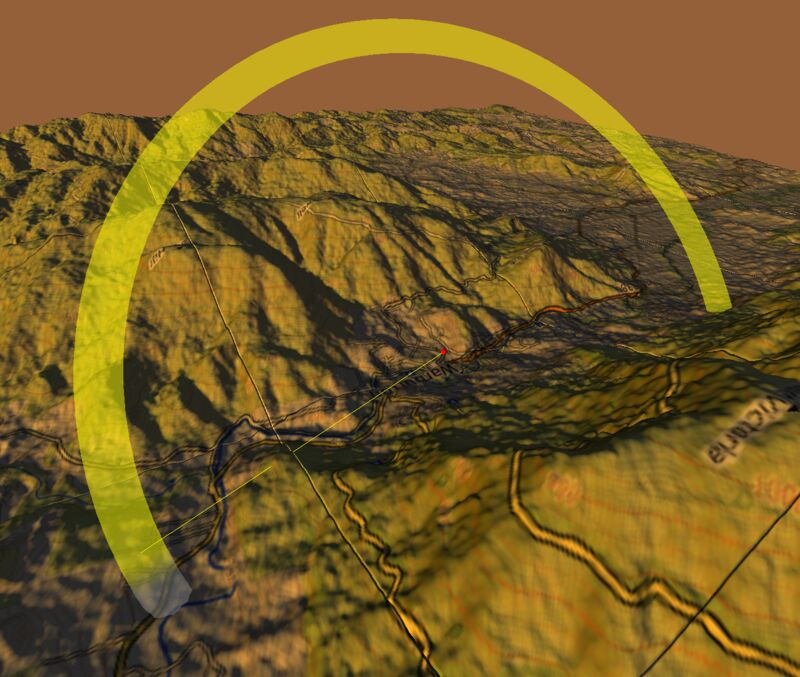
I made a static website which can show you the sunlight hours at any location on earth!
Take a look at the site - Live Demo
Take a look at the code - Code
its been a while since I worked on a project that I shared on my blog or made a video about and thought this was a fun side quest that I went on to share.
I have another post which is mostly written by AI about the functionality of the site here, but this one is more about the story of the site, so …
Let me tell you a story.

We were recently looking at moving to a property in a valley, with a river running through the middle of it.
We were warned by people who knew the area to stay on a certain side of the river or risk getting no sunlight. I thought this should be something I could simply solve looking at Google Maps or some online resource and found out quickly that this was quite a specialised query.
You can find the terrain for an area, you can get sunrise charts, there are calculations you can do to join the two together to work out occlusions due to terrain, but nothing to join it together.
Since I have very little experience with working with geospatial data, I started with googling it.
Attempt 0: Google it.

This failed due to no one supplying that information for free. There was definitely paid for services and data, and even some free data sources, but they wouldn’t provide the answer without a lot of data-wrangling.
Attempt 1: Attempt to data-wrangle it

The next idea was to get the data and work it out in Excel.
I quickly abandoned this after looking at some geospatial files and working out how the sun’s arc through the sky changes throughout the year, requiring a new straight line calculation to work out which areas the sun would cross at the different times of day.
Attempt 2: Ask an AI for an answer.

It wasn’t as simple as that as the AI didn’t have context on the GPS location which I wanted to know about and wasn’t going to actually run code to figure it out, the best it might do it query its big LLM knowledgebase or use MCP for some external tooling calls, but nothing internally or externally was able to answer the question for it or me.
Attempt 3: Local running cli tool to do the calc.

Initially I thought that I could solve this by just running it on my pc for specific co-ordinates using all my obtained data and having it number crunch. I got some working solutions early on, but it all ran very slowly due to having to query many external api’s and websites for specific daylight times. Even introducing a caching layer it would get rate throttled and slow down to a crawl. Every date or location change resulted in new data requests, a new calculation and many hours of waiting for numbers.
Attempt 4: Write a website to do it for anywhere.

Make it WebGL and show it in 3d, use the 3d terrain and astronomical data to plot everything and work out how much light you’re losing to mountains. Oh and on top of that get some road and houses maps data to give context to it when looking. Generate reports for year round calculations. Finally don’t hit other peoples webservers too heavily. How hard could it be ?
Solution 1:

Using just a few prompts I had a website using free geospatial information to display a terrain map with heights and an overlay of mapping data.
The next prompts were to visualise the sun arc for the location and date, followed by the actual time of day highlighting.
Getting the actual time that you would be able to see the sunrise at a location is a trivial calculation of raycasting from one location to another (The co-ordinates I have given, and the suns location). You draw a straight line between the two and every so often you check whether the line connects with any of the existing terrain. Interestingly this is how Wolfenstein and Doom did their 3d using raycast lines for every vertical line on the screen to calculate intersections with the levels and monsters.
Seeing as this came together quite nicely I went into scope creep mode. Reports and animations! This probably took up the most time, working out how I wanted them to work and coaxing the AI to make it so.
I also did a lot of refactoring near the end of the project to break up the monolith of a html file with everything in it. CSS, JS, HTML, Libraries, just everything. its not perfect now, but its a lot better.
Things I was very happy with

I was very happy with the final project and one of the goals I have on a normal project is to be able to share something I found useful with the world, share the code, share the learnings and I have accomplished all of that in the code base and here.
Another goal I have had in recent times is to see what I can do with plain html and not hosting any servers myself for the application. I am quite amazed and what this website’s scope goes as far as gathering data from multiple sources, caching it, stitching it together, doing custom calculations on the data, providing reports and even video output while using WebGL for nice interactive graphics is absolutely amazing. So I am very happy overall.
Things I wasn’t very happy with

Thankfully that’s quite short on this project, there were only two things that I wish were better. There is a bit of an issue with the underside of the world from the source data where there are some spikes downwards, I put a clamp on the values and this mostly sorted it out.
The other issue which I never found a solution to was getting seamless stitching between the tiles. I swear I threw about 30 prompts trying to sort that out, as well as manually trying my hand at the code at one point, but it doesn’t seem to affect the utility of the application, so I’ve been okay with letting that one lie.
Where to from here.

I was very happy to get to the point where I had a website that could finally answer my question, I was also very excited to share it in a way that people could use it.
As my first introduction to coding something from scratch using AI and Vibe Coding, I definitely consider this a success.
I think this project is mostly done, but there are definitely learnings towards leaving quite a lot of the grunt work to AI on future projects and getting my POC up and running, which is quite often enough to scratch the engineering itch that I have.
I like the new idea that is now in my belt, that now if I can’t answer the question myself, can’t find something on the internet by searching for it to solve it. I can now ask AI to see if it can find the answer and a step further try vibe coding it, prior to starting a new full stack project on my machine.
Even if it’s for the boiler plate code to get me up and running, it will probably be a big win time wise.