Stick Fighter: Fighting the Arduboy’s Constraints
When I first saw the Arduboy, I was immediately drawn to its charm and simplicity.
Over the years I’ve really enjoyed its community, making games for it and the big library of games available, the small system with its ability to code for so easily and its online community always bring me back for more.
I did however notice a hole in its library: there were no real-time 2D fighting games. This always bugged me, the platform was crying out for a competitive, fluid brawler, and I decided to take on the challenge.
View its game page and play it online here
Take a look at the source code here
The Vision vs. The Reality
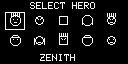
My goal was ambitious: a fast-paced 2D fighter featuring fluid animations, varied moves, and tight gameplay. I wanted something that felt like a simplified Street Fighter but fit into the tiny footprint of the Arduboy’s ATMega32U4.
The development process was a constant tug-of-war between my design aspirations and the hardware’s strict limits. I started with grand ideas of complex combo systems, but ended up with a refined, high-intensity brawler that emphasized spacing and timing, a compromise that arguably made the final game much more enjoyable to play.
Sprites vs. Bone Systems: A Deep Dive
Early on, I had to make a critical decision: use traditional frame-by-frame sprites or a procedural bone system. Traditional sprites were memory-hungry. Loading multiple frames for different moves for even two characters would have exhausted the flash memory before I even wrote the game loop. I chose a bone-based skeletal animation system.
Traditional 3D vs. Stripped-Down 2D
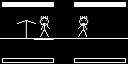
In traditional 3D animation, you have a hierarchy of bones, a complex skinning system, and often a root node that controls everything. This requires high-precision floating-point math and substantial RAM.
My system for Stick Fighter takes the exact opposite approach:
- No Mesh Skinning: Stick figures are just lines. I don’t need to skin a mesh, only render lines between endpoints.
- No Root Hips: Instead of a complex root-node hierarchy, I use a simplified, linear connection chain.
- Fixed Plane: Because the movement is restricted to a 2D plane, I avoid 3D rotations (quaternions) entirely. Every bone is represented simply by a start position and an angle.
Simplifying the Geometry
To avoid the performance hit of complex inverse kinematics (IK), I made two critical trade-offs:
- Constant Lengths: Since we are in 2D, the distance between joints never changes. This means I don’t need to calculate scaling factors. Each bone length is a pre-defined constant.
- Reduced Joint Complexity: By keeping the hierarchy shallow, I eliminate the need for recursive matrix multiplication.
The Mathematical “Cheat”
In Stick Fighter, I use a forward-looking pose definition. Each bone’s angle is stored relative to its parent bone. To draw a limb, I take the parent’s world position, add a simplified trigonometric calculation (using a pre-computed sine/cosine lookup table), and draw the line. Because I don’t perform complex matrix inversions or heavy transformations, the math remains manageable even for the Arduboy’s 16MHz processor.
The Technical Hurdle: Speed and Space
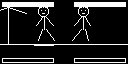
Implementing this on an 8-bit chip is deceptively difficult. I had to ditch standard float math for fixed-point arithmetic, and build a custom animation engine that could update character positions within the tight frame budget of the Arduboy’s screen refresh. The tooling was another challenge; I had to build a custom animation editor (in SDL) to preview and export these skeletal data structures, essentially building the game’s pipeline from the ground up.
Under the Hood: Hitboxes and AI
- Hit Detection: To save space, hit detection uses simple Axis-Aligned Bounding Boxes (AABB) relative to the bones. Since the characters are stick figures, I could use their limb vectors to create simple, fast-to-calculate collision zones.
- Enemy AI: The AI uses a simple Finite State Machine (FSM). It evaluates the distance to the player and decides between aggressive “rush down” states or defensive “spacing” states.
Everyone is a Bunch of Lines
To make each character stand out despite being simple stick figures, I developed a modular “head system.”
Instead of drawing a static circle for a head, I designed a set of small geometric primitives—simple line segments and points—that could be configured for each character. By varying the position of these “facial features” (like eye placement, hair spikes, or head accessories) and storing them as a tiny list of offsets, I could give each fighter a distinct silhouette.
Because these were just defined by a few coordinate pairs relative to the head’s bone, this system consumed almost zero additional memory, allowing me to inject unique personality into every character while keeping the animation overhead identical to a standard stick figure.
Developing for the Desktop: The SDL Wrapper
To speed up my iteration time, I built a custom SDL wrapper that allowed me to run the game logic directly on Windows. This acted as a virtual development environment for the Arduboy code.
The Pros: Rapid Iteration
- Faster Compilation: I could build a binary and test changes in seconds, bypassing the slow build and upload process to the physical microcontroller.
- Rapid Prototyping: It was invaluable for tweaking “juice” elements—like gravity, character movement speed, or animation frames—allowing me to get the “feel” pixel-perfect with ease.
The Cons: The Hardware Disconnect
- Input Differences: Keyboard input is fundamentally different from the gamepad and buttons of the Arduboy. I often found myself over-reacting or pulling off combos that were impossible on the real hardware.
- False Sense of Performance: The biggest trap was the lack of hardware constraints. I could easily blow past the 32KB flash memory limit or the tiny RAM budget without realizing it. On desktop, the game always ran at a perfect 60FPS, leaving me completely unaware that the Arduboy might actually be stuttering or running out of memory.
Balancing the Approach
To mitigate these risks, I adopted a strict “touch-base” policy. I would frequently flash the binary onto the actual console to check performance and memory usage. While emulators or regular hardware testing are necessary, the development speed gains from an SDL wrapper are absolutely worth the extra vigilance. If you pay attention to the hardware constraints, this hybrid workflow is an incredibly powerful tool.
Features Dropped and Lessons Learned
Not every idea survived. I had plans for complex stage hazards and a multi-tiered background, but they were cut to prioritize the core gameplay loop.
Playing Stick Fighter feels rewarding because of the “juice” added late in development:
- Dynamic Zooming: The camera scales and zooms based on character distance, adding cinematic flair.
- Character Scaling: Using procedural transformations to emphasize weight.
- Fireballs: Adding simple projectile physics gave the game the “spacing” element it desperately needed.
The Story and the “Wall”
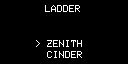
Despite the technical focus, I wanted the game to have personality. I ended up adding a surprisingly large amount of story text to character introductions, giving each stick fighter their own motivations.
There is a unique kind of fun in developing under extreme constraints. When you hit the “memory wall,” you’re forced to stop adding features and start polishing what you have. You can’t just throw more code at the problem—you have to optimize, rethink, and simplify.
Stick Fighter was a masterclass in this philosophy. It was a challenging project, but very rewarding as well.